
Version 4.02 · 4 September 2026
Download SQL DATA LENS
No registration, no credit card, no sales call. Every download starts as a full Pro trial and then continues as the permanently free Free Edition.
Installer
Per-user installation, start menu entry, and in-place updates through the built-in updater. No administrator rights required.
Download installerPortable ZIP
Unpack anywhere — a local folder, a network share, a USB stick. Nothing is written to the registry. Ideal for managed environments and side-by-side release evaluation.
Download ZIPWindows 10, 11 and Windows Server (64-bit) · ~132 MB · Java runtime included · signed binaries · what changed in 4.02
The three-minute setup
-
Unpack or install
Run the installer, or unzip the portable archive and start
sqldl.exe. Nothing else is required — the Java runtime is already inside. -
Add your server
File → New connection, choose your InterSystems version, and enter host, port and credentials. The matching driver is already bundled, so there is no JDBC URL to compose and no driver JAR to hunt down. If Caché or IRIS is installed locally, use Tools → Import connections and the details are filled in for you.
-
Start querying
Every namespace on the server appears in the tree automatically — you do not need to know their names. Open a namespace, press F5 on a query, and you are working.
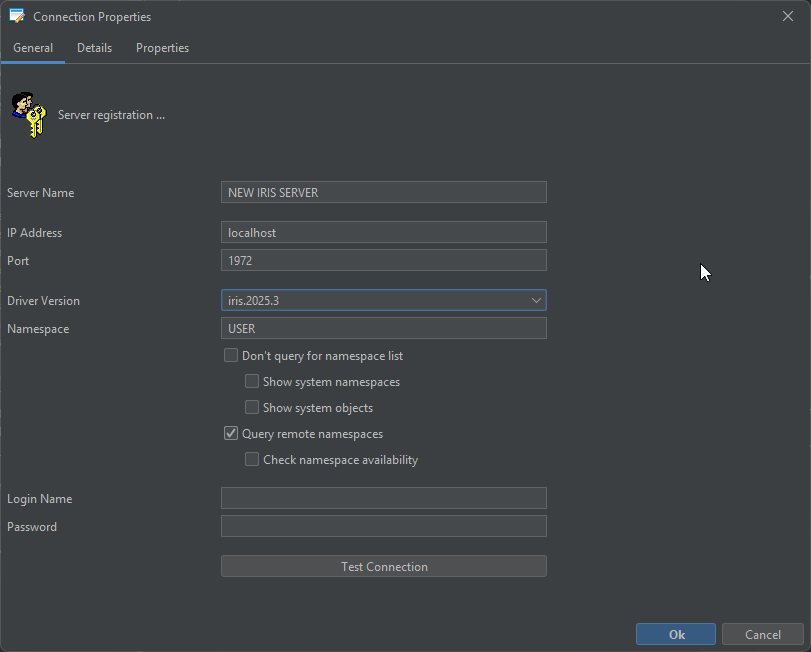
Step by step with screenshots: first steps · every field in the connection dialogue · installation details
Release notes by email
New IRIS driver support, new features, breaking changes. Roughly six emails a year, no marketing, unsubscribe in one click.
Not connected yet. In the meantime, write to support@sqldatalens.com with “release notes” in the subject and you will be added to the list.
Before you download
Is there a macOS or Linux version?
Not today — SQL DATA LENS is a Windows application. A macOS build is on the roadmap, and Linux would follow it, but neither is available yet and we would rather say so here than have you find out after downloading. If you need a cross-platform client right now, the comparison page says which alternative we would pick.
Do I need to install Java?
No. A private Java runtime (JRE 21) is bundled inside the download and is used only by SQL DATA LENS. It does not touch a system-wide Java installation, does not appear on the PATH, and raises no Oracle Java licensing question.
Do I need administrator rights?
No. The portable ZIP needs nothing but a folder you can write to, and the installer performs a per-user installation. Nothing is installed on the database server either — not an agent, not a stored procedure, nothing.
Which JDBC drivers do I have to find?
For InterSystems, none. 9 InterSystems drivers ship inside the application — 8 IRIS versions from 3.3 to 3.11.0 plus Caché 2018.1 — each loaded in its own classloader, so a 2018 Caché server and a current IRIS instance can be open in the same session without a driver conflict.
What happens after the trial ends?
After the trial, SQL DATA LENS automatically continues as the permanently free Free Edition while retaining your connections, scripts and settings. You can keep using it with IRIS Community Edition, SQL Server Developer, PostgreSQL, DuckDB and the other supported free systems. Only connections to licensed production databases require a paid licence. See pricing.
Can I upgrade or run versions side by side?
The installer upgrades in place and keeps your connections, scripts and settings. For side-by-side evaluation, place the portable ZIP in a separate folder while keeping your installed version unchanged. Coming from Caché Monitor? Read the notes for Caché Monitor users.