
The SQL & data tool built for InterSystems IRIS and Caché
Browse the globals beneath your tables. Query across namespaces and servers in a single statement. Find the cached queries and missing indexes that cost you time. One fast Windows desktop app.
Windows 10, 11 and Windows Server (64-bit) · ~155 MB · portable ZIP or installer · full 30-day Pro trial, no credit card
- No telemetry — nothing leaves your machine
- All IRIS & Caché drivers bundled
- No admin rights required
- In development since 2004
Why a dedicated tool?
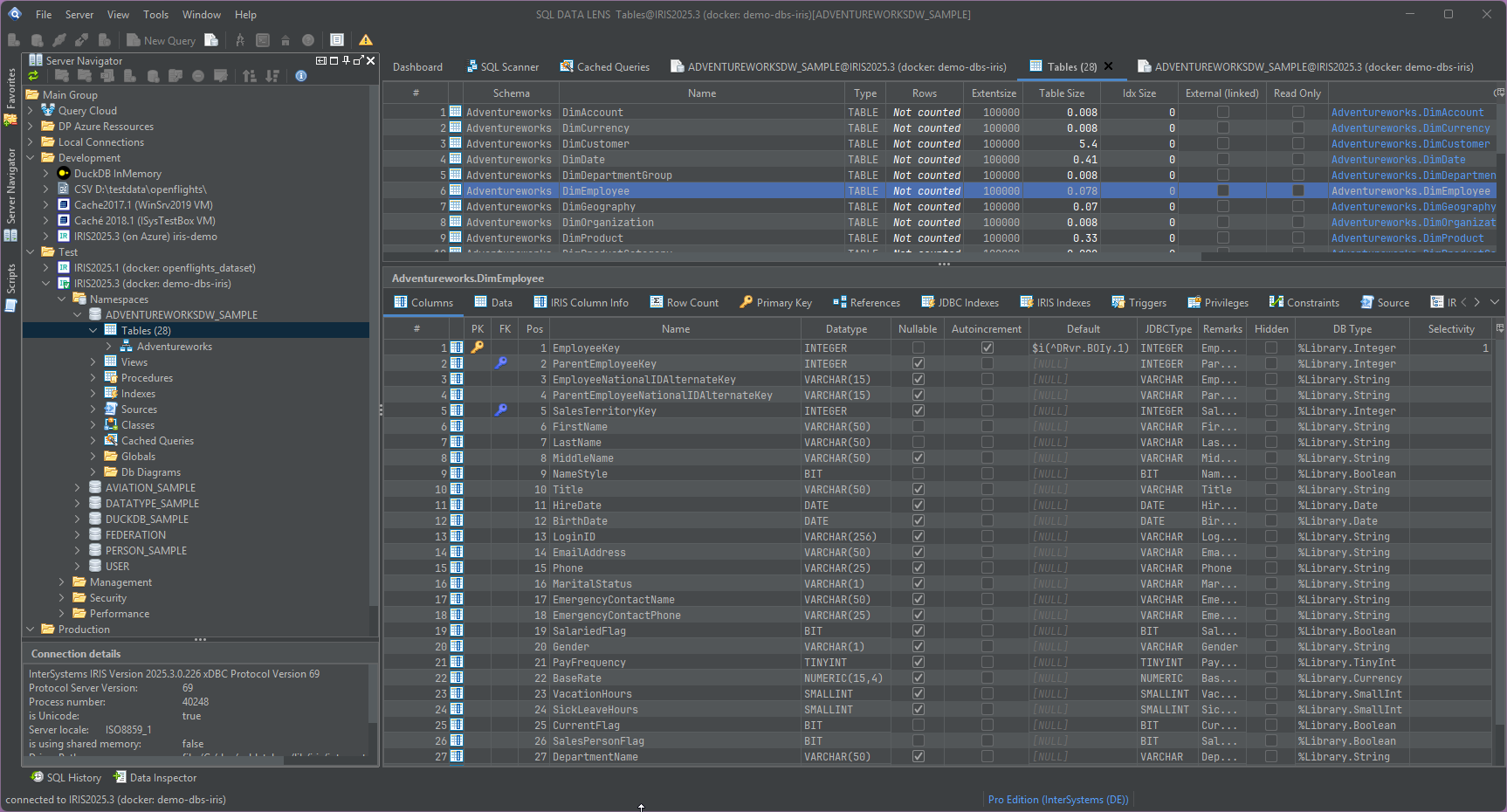
InterSystems IRIS combines SQL with object and multidimensional data capabilities. SQL DATA LENS is designed specifically around this architecture: it brings globals, namespaces, cached queries and SQL metadata together in one dedicated workspace. It sits alongside VS Code for ObjectScript development and the Management Portal for administration, complementing both when the focus shifts to exploring data, SQL structures and performance.
See how SQL DATA LENS complements the Management Portal and compares with DBeaver and DataGrip →
The difference
Three capabilities designed specifically for IRIS and Caché
These three capabilities define the IRIS-specific focus of SQL DATA LENS. The remaining features make everyday database work faster and more convenient.
See beneath your tables
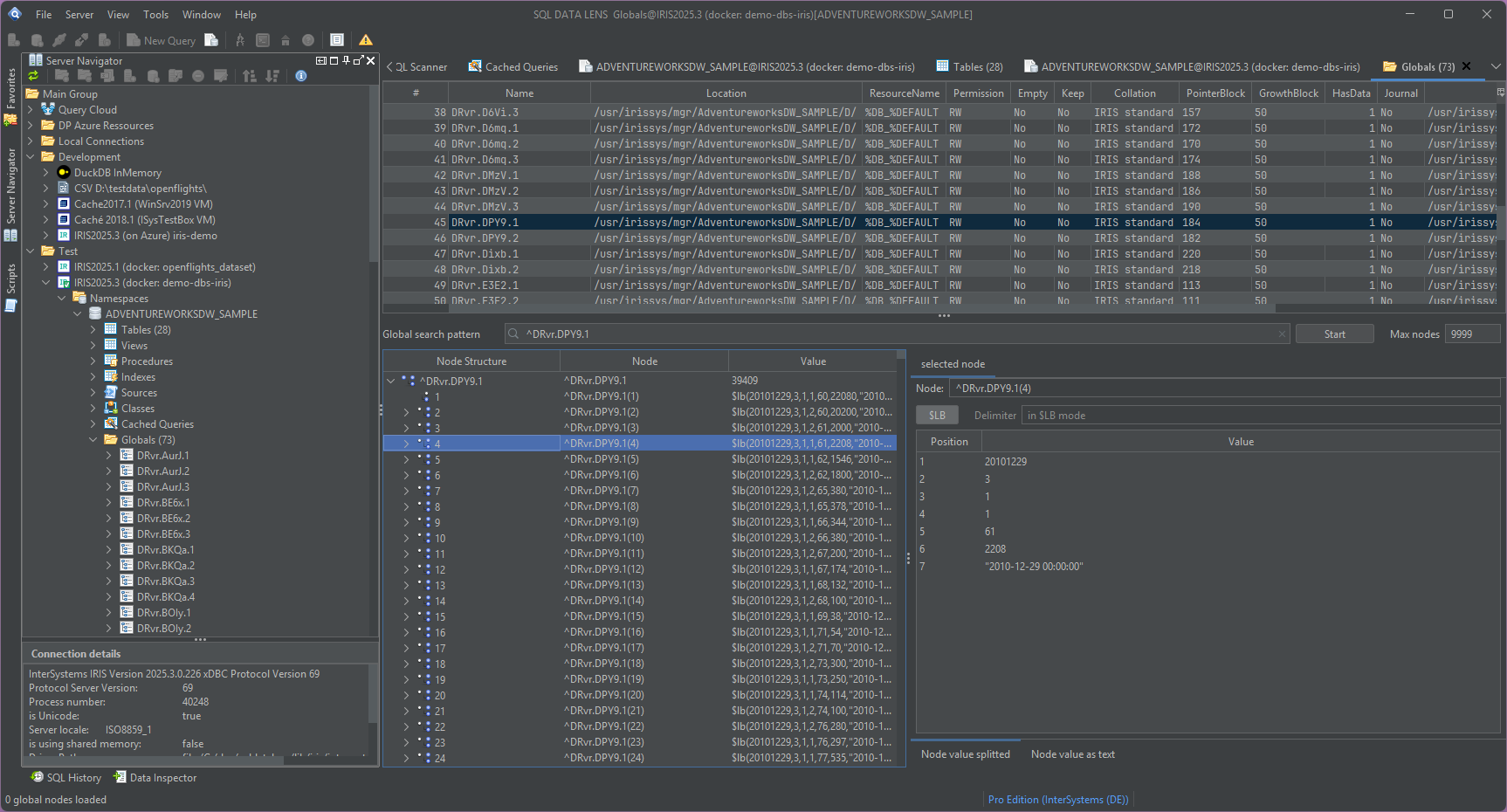
The Global Browser drills into the multidimensional
storage under your SQL schema: navigate subscript levels, resolve
$LISTBUILD values into individual fields, and view
mixed data types and non-tabular global structures in a clear,
readable form.
One query. Many namespaces. Even many servers.
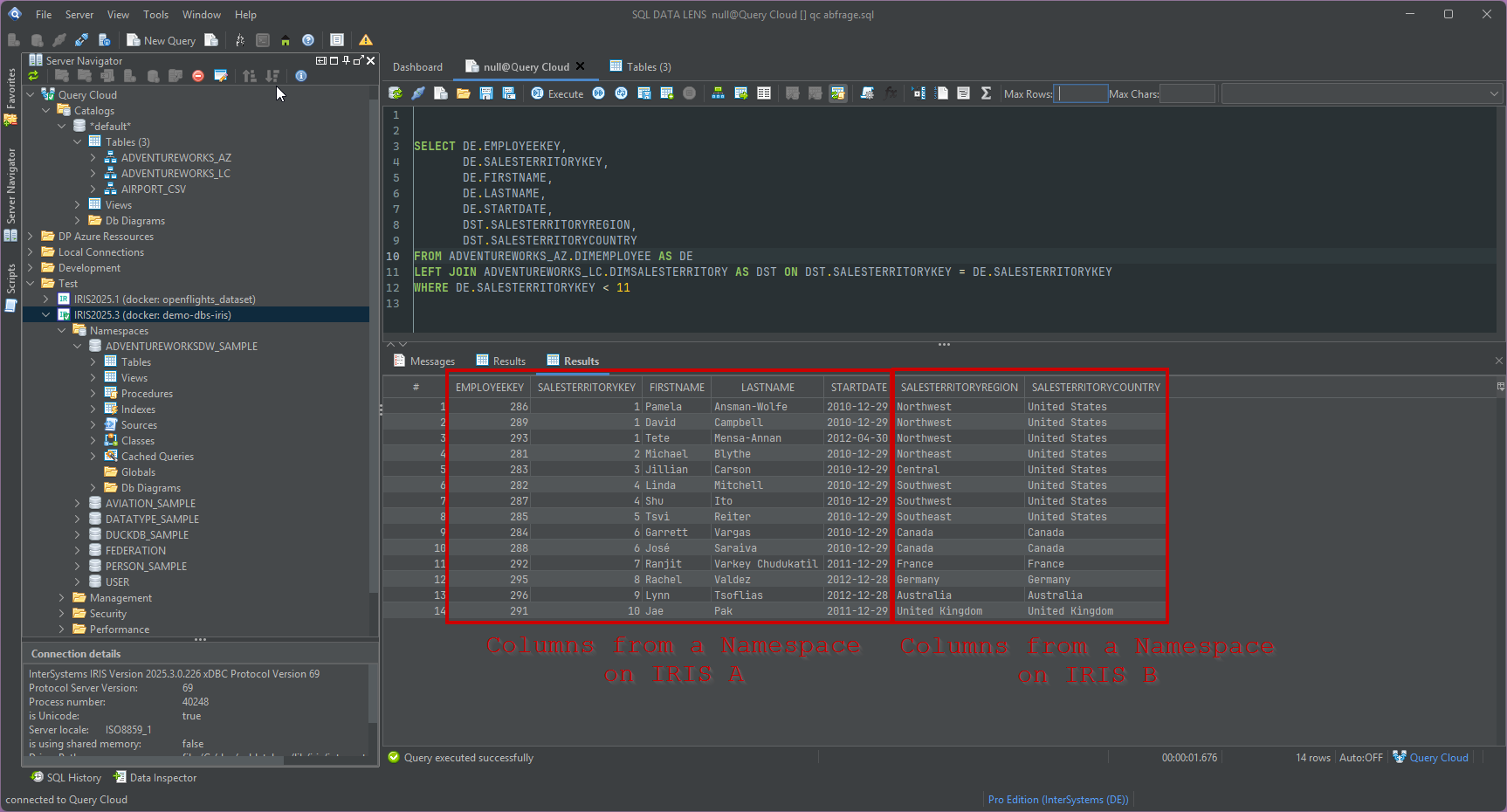
Query Cloud joins data across IRIS namespaces, across servers, and even across systems — IRIS together with SQL Server, Access or a CSV file. Real SQL joins, combined on the client, with nothing installed on any server.
Understand and optimise SQL performance
The performance suite scans a namespace for redundant indexes and foreign keys without an index, lists and clears expensive cached queries, shows execution plans right in the editor, and profiles statements with PTools and PStats.
And the everyday work just flows
The parts you touch every hour: connections that configure themselves, an editor that understands IRIS SQL, and frequently used operational views brought together in one place.
Zero-config connections
8 InterSystems drivers ship inside the app — 7 IRIS versions from 3.3 to 3.10.5 plus Caché 2018.1, loaded side by side in isolated classloaders. Caché and IRIS versions of different generations work in the same session, without driver conflicts.
Namespaces, found for you
The Server Navigator lists every namespace on a server automatically. No namespace names to remember, no separate JDBC connection per namespace.
Class and routine inspection
Read class and routine source, including generated INT code, and copy a class to another namespace or another server from the context menu.
Data Pumper
Copy tables between namespaces, servers and different database systems — test to production and back — without an export/import detour.
ER diagrams from established schemas
Generate an ER diagram from an established Caché namespace and make its schema easier to understand and share.
Files as SQL tables
Drag a CSV, Parquet or JSON file onto a DuckDB connection and query it. Or point a CSV connection at a folder or ZIP archive and treat every file in it as a table.
Built for production environments
A tool that touches production data has to earn trust
Most SQL DATA LENS users work on healthcare, finance and industrial systems where a careless client is a real risk. Three commitments follow from that.
Your data stays yours
SQL DATA LENS runs entirely on your desktop. No telemetry, no usage analytics, no data sent anywhere. The app makes exactly two outbound connections: the update check and licence activation — both of which you can see and control.
Nothing to ask IT for
Per-user installation or a portable ZIP, signed binaries, and a bundled private Java runtime — so there is no Oracle Java licensing question and no admin rights needed. Nothing is installed on the database server, ever.
A stable home
The product started as Caché Monitor and has followed the platform through the Caché-to-IRIS transition for well over a decade. Since 2026 it is developed and supported by Data Prudentia GmbH — same developer, now with a company behind it.
Free for free databases. Paid for production.
No crippled Free version, no row limits, no nag screens. What you pay for is where you may connect — and Query Cloud, the one feature the paid editions keep to themselves.
Free Edition — $0, permanently
For databases that are themselves free: IRIS Community Edition, SQL Server Developer and Express, PostgreSQL, DuckDB, SQLite, H2, MariaDB, Trino. Unlimited connections, no time limit; Query Cloud needs a paid edition.
Named User — $299 per user / year
≈ $25 per user / month, billed annually
The moment you connect to a licensed production IRIS, Caché or SQL Server instance, you need a paid licence. That is the entire rule. Team and Enterprise licences cover larger groups.
Explore your IRIS data from SQL down to globals
Download, unzip, connect. Your first namespace is on screen in about three minutes.
Windows 10, 11 and Windows Server (64-bit) · ~155 MB · version 4.00 · full 30-day Pro trial included