
Global Browser
See what is actually stored beneath your tables
Walk the multidimensional globals under your SQL schema, drill into subscript levels and resolve $LISTBUILD values into readable fields.
Unique to SQL DATA LENS
- Drill through subscript levels
- $LISTBUILD values resolved into fields
- Jump from a result row to its Global node
- Open a .gof export offline, Named User or above
- Mixed subscript types handled
Sooner or later a question arrives that SQL cannot answer. A row exists in the
global but the class query does not return it. A property reads as null through
the object layer while the data is visibly there. A legacy routine wrote
directly to storage twenty years ago and nobody remembers in which format. At
that point you need to look at the global itself, and the usual options are a
terminal session with ZWRITE or asking someone with server access
to do it for you.
Why globals matter even when you only write SQL
Every piece of data in an InterSystems IRIS database is stored in an efficient, tree-based, sparse multidimensional array — a global. Globals underpin both the object and the SQL interfaces of the platform: one data dictionary, reachable as tables, as objects, as multidimensional arrays or as documents, all resting on the same storage. You never have to work with them directly, but understanding how IRIS uses them is what turns an unexplainable result into a diagnosis.
Data can be stored in a global under any number of subscripts, and subscripts
are typeless. One subscript at a given level might be the integer
34 while its neighbour at the same level is the string
"LineItems". A stock inventory application holding item, size,
colour and pattern might be laid out like this:
^Stock(item,size,color,pattern) = quantitywith data such as:
^Stock("slip dress",4,"blue","floral") = 3That flexibility is exactly why generic SQL clients have nothing to show you here: there is no fixed row and column shape to render. The Global Browser renders the tree instead.
Navigating the tree
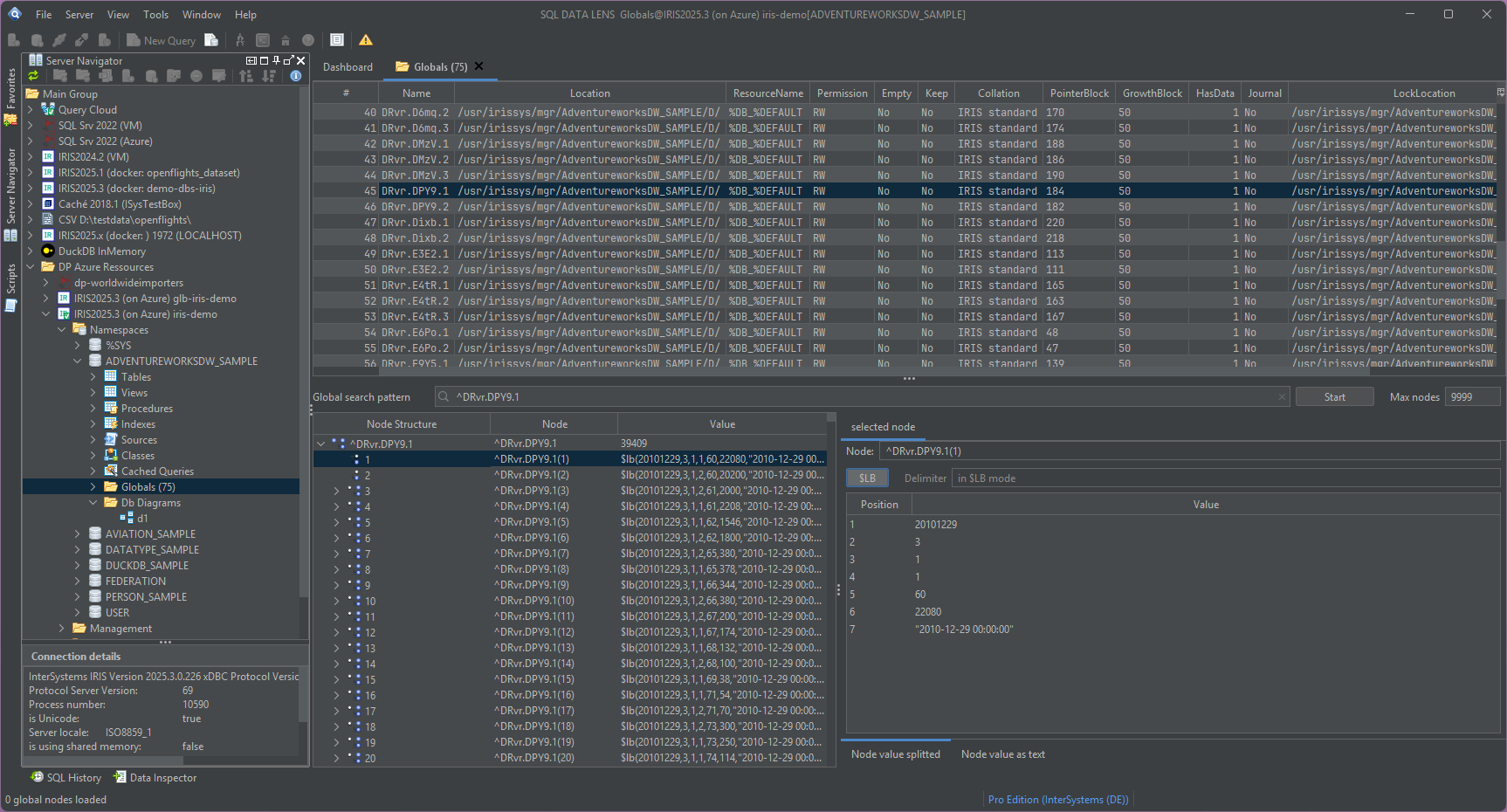
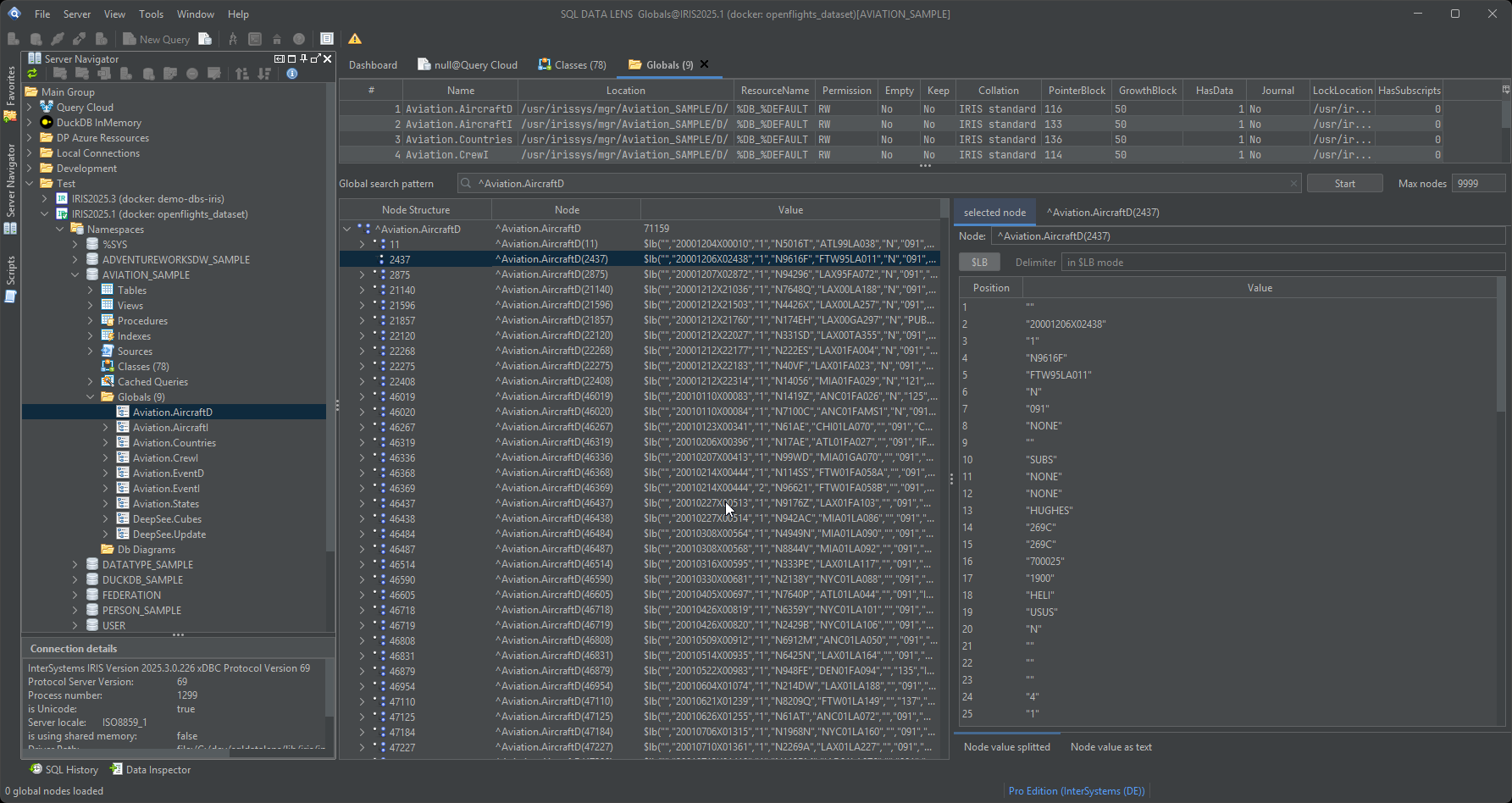
Globals in a namespace are listed as a folder in the Server Navigator, with an accurate item count, and expand level by level. You descend one subscript at a time, seeing the subscripts that actually exist at each level rather than guessing at a range, and the value at any node is shown as soon as you select it. The subscript path is displayed in a form you can copy straight into a terminal or into ObjectScript, so what you found in the browser is reproducible elsewhere.
Because subscript levels can mix data types on the same level, the browser sorts and displays numeric and string subscripts side by side without collapsing one into the other — a case that used to be handled incorrectly and is now explicit.
$LISTBUILD values, resolved
IRIS and Caché store the properties of an object in a compact binary
representation built with $LISTBUILD, so a single global node
typically holds an entire row. Dumped raw, that node is a run of unprintable
bytes with the occasional recognisable string in it. The Global Browser
decodes the list and shows the elements as individual, numbered fields, which
you can then line up against the storage definition of the class to see which
property sits in which position.
This is the single most useful thing the tool does with globals. It is how you confirm that the value really is in slot 7 but the class expects it in slot 8, or that a property was written as a string where the storage definition says integer.
When the data is not what it claims to be
Legacy systems that bypass the SQL and object layers introduce failures that
are hard to see from above: values that cannot be read at all, values that
look valid but do not match the metadata, and values that get silently coerced
to fit an expected type. The Global Browser is deliberately honest about them.
If you ask it to interpret a node as $LISTBUILD and the node is
not in that format, it tells you the format is invalid and shows you what is
actually there, instead of rendering plausible nonsense or failing with a
stack trace.
That behaviour pairs with the read-error handling in the SQL editor: the editor finds you the row and column of a value that does not match its metadata, and the Global Browser tells you what is stored there.
From table to storage and back
The route into a global usually starts from a table. The Table Viewer's IRIS storage and index tabs name the globals a table and its indexes actually live in, together with their sizes, so you can go from "this table is 14 GB" to the specific global holding it, then walk into that global here. Working in the other direction is just as common: find an orphaned subscript in the browser, then go back to SQL to work out which application wrote it.
Sizes are worth watching on that route. A table whose index globals have grown larger than its data global is usually a story about a redundant index, and that is a question for the performance tools.
There is a third direction, and it is the one that answers "dare I touch
this?". Right-click a global and choose Where is this used?:
the global name, with its leading ^ and subscripts stripped, goes
straight into a server-side search across every class and routine of the
namespace. Nothing is downloaded to search it, and the answer arrives in a few
seconds. See search.
From a result row straight to its Global node
Since 4.02, right-click a row in a query result against IRIS or Caché and choose Show in Global Browser... to open the exact subscript that row lives at — not just the global's name, the real subscript values of that row, whether the key is a single number or several columns together. Select more than one row and you get a pick list instead, one entry per row.
It only works when the row's table can be resolved to a single, ordinary persistent class — not for a join or a view, and not for a table on custom storage — because that is the point where SQL DATA LENS can be certain which global and which subscripts you mean. When it cannot, the status bar says which of the two conditions failed instead of guessing. This is available in every edition, the same as browsing a live global.
Opening a .gof export with no server at all
A .gof file is an InterSystems global export in the block format
(%GOF, OutputFormat 7 of %Library.Global
or the Management Portal's Export Globals with "block format"). Since 4.02, File > Open .gof File... opens one
directly and shows it like a live global — no connection back to the server it
came from, so a dump from a customer site or an incident can be examined on a
laptop that has never seen that network.
The header names the format version, the export time and the namespace the
export came from; the global list on the left shows node and byte counts per
global, and the subscript tree beneath it expands level by level exactly like
the live browser, so an export of several gigabytes with millions of nodes
stays navigable rather than trying to load at once. The value panel reads a
node as text, as a hex dump, or decoded as $LIST elements, and
says plainly when a value cannot be decoded rather than showing something that
looks plausible and is not. Filter the global list by name or pattern, jump
straight to a node with Go to (for example ^Global(1,"x")), and export or copy a selection as ZWRITE text or
CSV.
Two limits worth knowing before you rely on it. Only 8 KB databases in
the little-endian block format that current IRIS and Caché 2017.1+ write are
supported — a 2 KB database, a big-endian file or a multi-volume export
is refused with a message naming the rule and the byte offset, because no
sample of those exists to verify the reader against. And in 4.02 a subscript with several non-Latin-1
characters, or a value stored as compact Unicode, is shown in its raw form
rather than as text; decoding both is planned for the next release. Opening
a .gof file needs Named User or above and is part of the
30-day trial that every download starts with; the Free
Edition shows the menu entry greyed out with the reason attached rather than
hiding it.
Being able to read your own storage changes how quickly odd data gets
explained — a ten-minute look instead of a ticket to whoever holds terminal
access. Browsing a live global, and jumping in from a result row, are in
every edition, including the free one; opening a .gof file
offline is the one part of this page that needs Named User or above, since
it works without a server connection at all and the edition is the only
thing left to check.
Download SQL DATA LENS and open a global on a test
namespace to see what your tables really look like underneath.
Explore your IRIS data from SQL down to globals
Download, unzip, connect. Your first namespace is on screen in about three minutes.
Windows 10, 11 and Windows Server (64-bit) · ~132 MB · version 4.02 · full 30-day Pro trial included