
Class Viewer
Inspect classes and routines, and copy them between servers
Browse class and routine source (including INT code) and copy a class to another namespace or another server from the context menu.
- Class source, methods and class queries
- Method, property and parameter signatures on IRIS
- Generated INT code for routines
- Storage definition behind a table
- Copy, import, export, compile and delete
- Stored procedure CALL and SELECT scripts
In IRIS and Caché, a table is a class. So the moment a query behaves oddly, the
explanation is often one layer up: a computed property, a class query with a
WHERE clause you did not know about, a trigger, an
SqlComputeCode block, or a storage definition that no longer
matches what the class thinks it stores. Answering that from a SQL client
usually means switching to a different tool and reconnecting to the same server
you were already connected to.
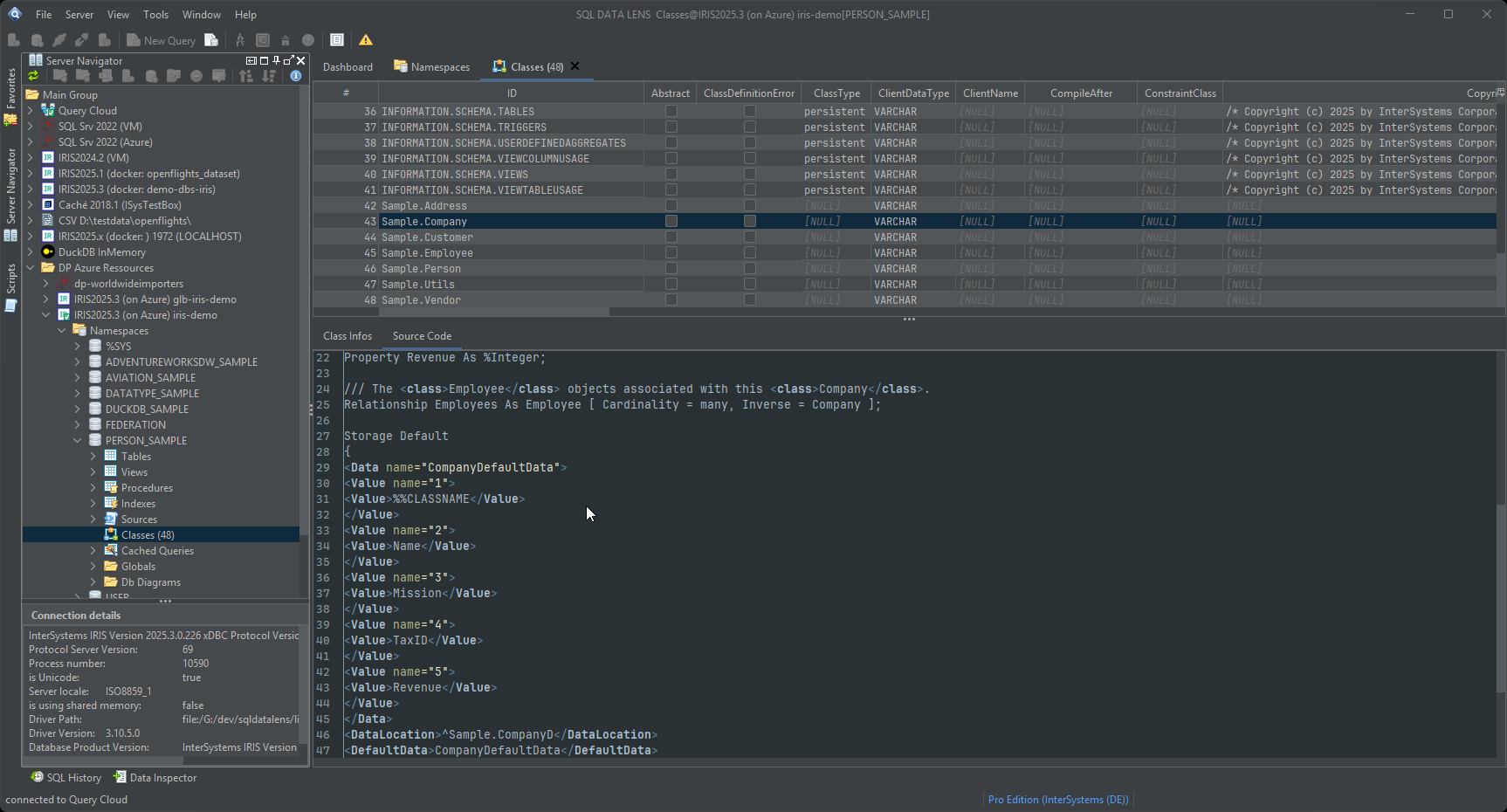
What a class actually contains
The Class Viewer shows the details of a class: its properties, its methods, its class queries, its parameters, its indexes and its relationships. Classes are listed per namespace in the Server Navigator, grouped by package, so a namespace with several thousand classes stays navigable.
Class queries deserve a specific mention, because they are the ones that catch people out. A class query is a named, parameterised query defined on the class and callable from SQL as a stored procedure — perfectly ordinary in IRIS, and entirely invisible to a client that only reads the SQL catalogue. Being able to read its definition tells you what it filters and what it assumes.
Source code, including the generated code
You read class and routine source directly in SQL DATA LENS: the class definition as written, and for routines the generated INT code as well. INT code matters when the question is what the compiler produced rather than what the developer wrote — a generated accessor, an index-maintenance method, or the code behind a computed property that only appears after compilation. It is also the fastest way to see what a macro actually expanded to.
Together with the class name shown on the Table Viewer and the globals named on its storage tab, this closes the loop from SQL name, to class, to generated code, to the global the values are stored in.
Method, property and parameter signatures, on IRIS
Since 4.02, selecting a class on IRIS adds an Atelier
Details branch below the usual Methods, Fields, Queries and Storages
groups: the class description, and — grouped as Methods, Properties and
Parameters — every member shown with its full signature, for example CreateObject(Progid As %Library.String) As %Library.RegisteredObject,
plus its description text where the class carries one. Up to 4.01 the tree on
IRIS listed bare member names read over SQL and nothing more; the new branch
reads the same way the source itself documents intent, without opening the
class in an editor.
This comes from the Atelier REST API's action/index call — the
same web server connection the Source Code tab already uses, not a
from-scratch ObjectScript parser — so it needs Atelier API version 4 or newer
(negotiated automatically) and a reachable web server. Without either, an
older server, no web server configured, or a transient network problem, the
Atelier Details branch is simply left out; the rest of the tree, read over SQL
as before, is unaffected. The branch is specific to IRIS; the usual
Methods/Fields/Queries/Storages groups keep working exactly as before on
both platforms either way.
Copying a class to another server
Since 4.01: this works on IRIS too. Export, Import, Copy, Compile and Delete run on IRIS over the same web server endpoint the Source Code tab already uses, and a failed compile shows the server's own error text and compiler output rather than a false success.
The history is worth a sentence, because the previous release said the opposite. Up to 3.24 these five were empty stubs on IRIS that failed silently or with an internal error; 4.00 disabled them there and said so in the menu; 4.01 implements them. On Caché they have always worked and are unchanged.
Moving one class between environments is a routine job that traditionally involves an export to XML, a file share, an import dialogue and a compile. The Class Viewer makes it three steps:
- Select the class and choose Copy from the context menu.
- Choose the destination server and namespace.
- That is all — the class is transferred and compiled on arrival.
Because the destination is picked from your existing registered connections, the same gesture works within a server and between servers. Copying a utility class from development into a test namespace, or lifting one class out of a customer system into a local instance for reproduction, stops being a small project.
A connection you have marked read-only refuses all five, along with everything else that writes — which is the point of marking it. See environments and read-only.
Two things to keep in mind. Auto-compile means the class is compiled on the target, so a class with unmet dependencies will report compile errors there — which is useful information, but do it deliberately rather than into production. And copying a class copies the definition, not the data; for rows, use the Data Pumper or Query Cloud.
Import, export and compile
The full set of class operations available from the tree:
- Import classes, with automatic compilation after import.
- Export classes to file, for version control or for handing to someone who needs the definition rather than access.
- Copy classes between servers and namespaces, with automatic compilation on the target.
- Compile classes in place — which is what you want after
changing a table definition through DDL, or when a table's
LAST_COMPILEDtimestamp is older than you expected.
Where this sits next to your IDE
This is not an ObjectScript development environment, and it is not trying to be one. Write code in VS Code with the InterSystems extensions or in Studio; that is what they are for. The Class Viewer is for the questions that come up while you are working with data — what does this class do, what is it generating, what does its storage look like — answered without leaving the tool you are already in, with a copy onto the other server when that is what you need next.
The question the Class Viewer cannot answer on its own is who else touches a class. That is the source code search: server-side, across every class and routine of the namespace, and reachable from a table as Where is this used?.
Stored procedures are handled alongside classes: SQL DATA LENS generates
CALL scripts from their metadata and can produce
SELECT variants that wrap each result column in
%ODBCIN, %INTERNAL or
CAST(col AS VARCHAR(255)), which is the quickest way to find a
data-type mismatch in a procedure's output. Run any of them from the
SQL editor.
Reading the class is often the shortest route to explaining the data. Download SQL DATA LENS and open the class behind the table you have argued about most.
Explore your IRIS data from SQL down to globals
Download, unzip, connect. Your first namespace is on screen in about three minutes.
Windows 10, 11 and Windows Server (64-bit) · ~132 MB · version 4.02 · full 30-day Pro trial included