
Table Viewer
Browse, filter and edit table data directly
Open a table, filter it, sort it, edit cells in place and see IRIS-specific details other tools never show you.
- Filter history remembered per table
- Filter and sort from the context menu
- Extent size, selectivity and outlier stats
- Storage and index global sizes
- Tune Table and Rebuild Index for IRIS
Half of all database work is answering "what is actually in this table?" — and then, ten seconds later, "and why is that value wrong?". The Table Viewer opens a table, lets you filter and sort it from the context menu, and turns the rows you have found into the exact statement that fixes them, ready to run in the SQL editor. Alongside that it collects the metadata InterSystems keeps about the table — which is far more than a generic SQL client ever asks for.
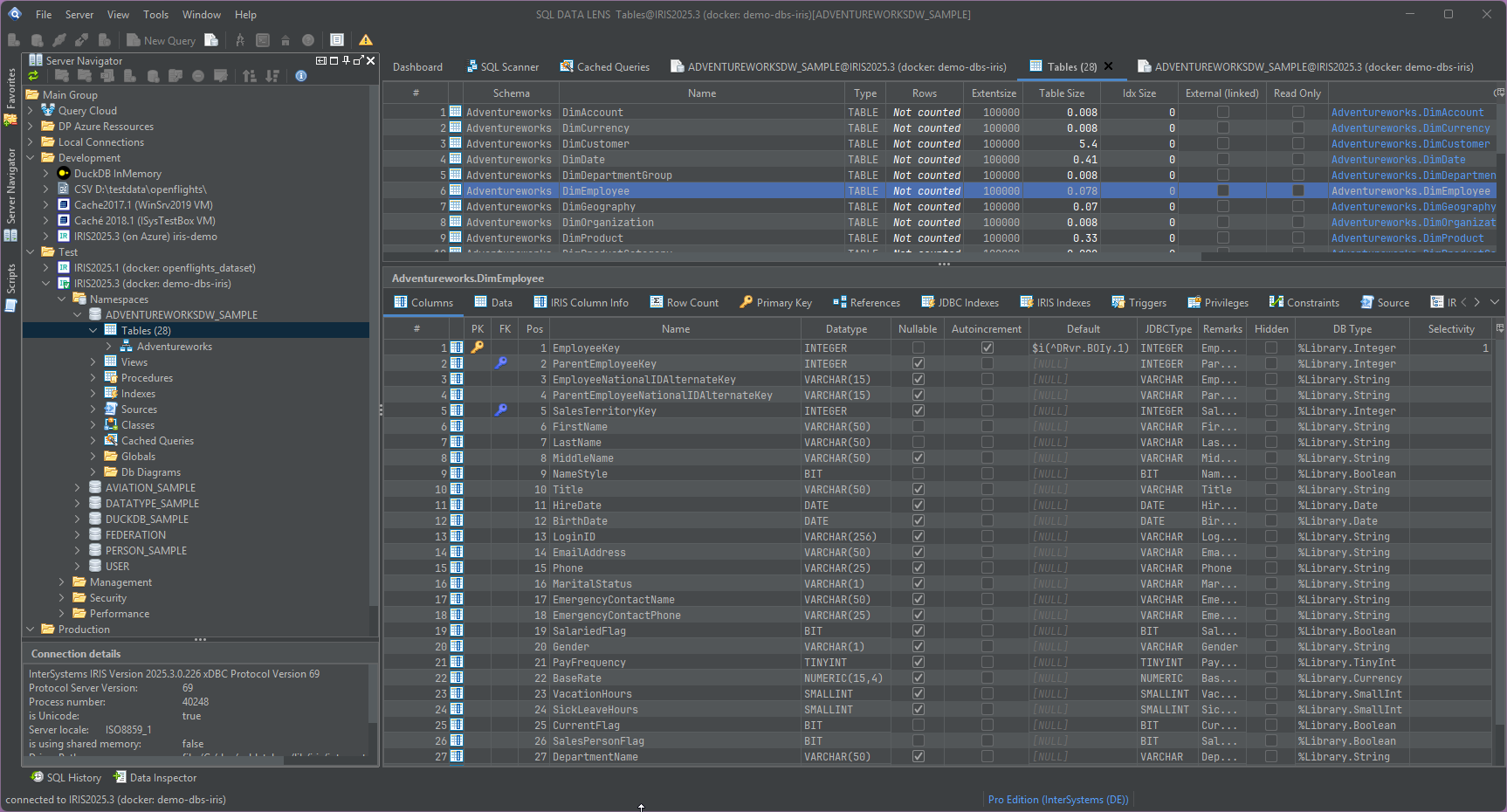
Browsing and filtering, and why editing means SQL
Filtering is available from the context menu — right-click a value and filter for it, rather than composing a predicate by hand — and columns sort on click. Since 4.02, the Filter field itself remembers the filters you last used on this table and offers them back as a dropdown, newest first with duplicates collapsed, so a filter you typed last week is one click away rather than retyped from memory — and it survives a restart. A table can be opened in a new tab so you can keep two of them side by side, which is how most comparisons actually get done.
No grid in SQL DATA LENS accepts a typed value. The Data
tab's editable toggle switches the query to an updatable result set
and turns on Add, Remove, Commit and Rollback, but that does not make cells
typeable — the toggle is for the Add/Remove/Commit machinery, not for editing
a value in place. To change a value, select the row and use Copy as ▸ SQL Update from the grid context menu: it builds
the statement, keyed on the primary key, and you adjust and run it in the SQL editor — two clicks and a value edit
instead of a hand-written UPDATE with a WHERE
clause you have to get exactly right.
Two limits govern what is fetched, and they are the same pair used by the SQL editor:
- Max rows limits how many rows are fetched from the server.
- Max chars limits how much of a character or stream column is fetched, so a table with a 4 MB HTML document in every row still opens instantly.
Both settings are saved and restored after a restart. To remove a limit, clear
the field. Some JDBC drivers ignore the setMaxRows hint — DuckDB,
for one — so for those the limit is applied as TOP or
LIMIT in the generated statement instead, and holds either way.
Counting rows is a separate action, because on a large table it is not free. The count recognises keywords in object names that need quoting, so counting on system tables works rather than failing on a reserved word. Linked foreign tables can be viewed like any other table.
Double-click any cell to open its full value in the Data Inspector as text, HTML, XML, JSON, an image or raw binary — which is what you want the moment a column holds a stream rather than a number.
Columns, keys and the DDL
The Columns tab lists every column with its type, length, nullability and default, and marks primary and foreign keys with icons. Hovering the foreign key icon names the referenced table, so you can trace a relationship without opening the constraint definition — the fastest way to understand an unfamiliar schema short of generating a database diagram.
A DDL tab reconstructs the table source as a CREATE TABLE
statement, which is what you paste into a migration script or a ticket. IRIS
default entries for AUTO_INCREMENT columns are handled correctly,
so the generated DDL reproduces the identity behaviour of the original rather
than a plausible-looking approximation of it:
CREATE TABLE Sample.Invoice (
  ID        INTEGER  NOT NULL AUTO_INCREMENT,
  InvoiceNo VARCHAR(20) NOT NULL,
  Customer  INTEGER,
  Amount    NUMERIC(12,2),
  CONSTRAINT InvoicePK PRIMARY KEY (ID),
  CONSTRAINT InvoiceFK FOREIGN KEY (Customer) REFERENCES Sample.Customer(ID)
)
For a table generated from a class, the exact class name in the IRIS multi-model dictionary is shown too — the piece of information that connects the SQL name you are querying to the class you will open in the Class Viewer or in VS Code.
The table list itself carries the per-table properties IRIS records, in the grid rather than behind a dialogue, so you can sort a whole namespace by them:
-
LAST_COMPILED— when the class behind the table was last compiled. Sort a namespace by it and the tables nobody has touched since 2013 separate themselves from the ones a deployment changed this morning. -
OWNER— the owner of the table, which is what privilege problems usually come down to. -
ALLOW_DROP— whether the table may be dropped through DDL at all. Worth reading before you write the migration script rather than after.
The statistics IRIS collects, made visible
IRIS and Caché periodically examine table data and collect statistics through an operation called Tune Table. Those statistics decide which plan the optimiser picks, and they are the first thing to check when a query that used to be fast is not. The Table Viewer reads them out:
- Extent size — the number of rows the platform believes the table has. Compared against a real count, a badly wrong extent size explains a great many bad plans on its own.
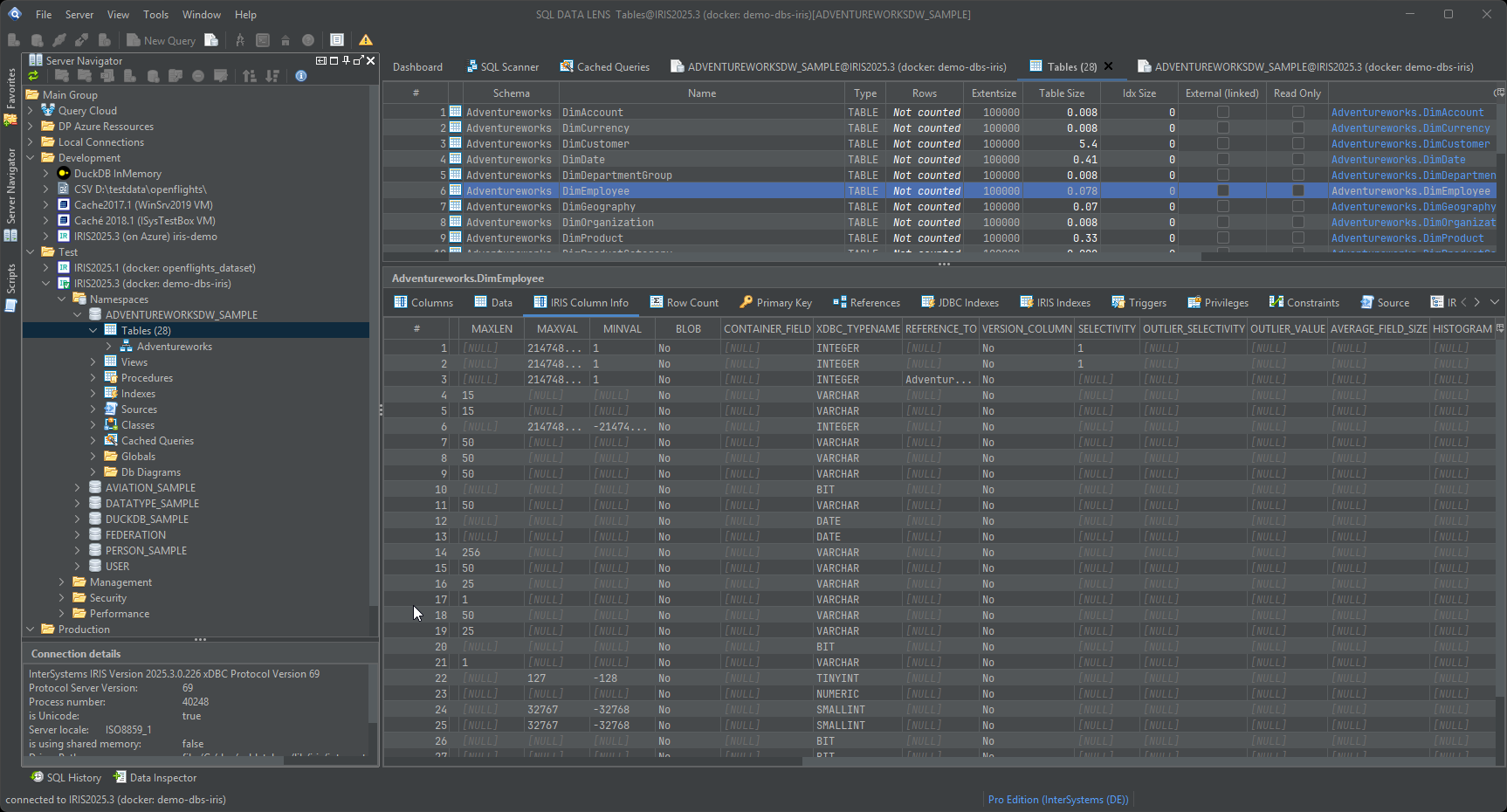
- Selectivity, per column — the percentage of rows a query
would return when looking for a typical value of that column, calculated as
1/DwhereDis the number of distinct values. A column with a selectivity of 50% is not worth an index; one at 0.001% almost certainly is. - Outlier selectivity and outlier value — the
single dominant value in a skewed column. This is the classic trap: a status
column that is
'C'for 98% of rows and something interesting for the rest, where the average selectivity tells you nothing useful. - Average field size, and the rest of the per-column statistics, on the IRIS Column Info tab.
You can run Tune Table from the viewer itself for a table, and the table view
refreshes after tuning an entire namespace so you are not looking at
pre-tuning numbers. There is also a Tune Table variant with
%RECOMPILE_CQ, which recompiles the cached query classes using the
new statistics — the step people forget, after which the old plans keep being
used and the tuning appears to have achieved nothing. Cached queries for the
selected table can be listed and deleted individually, or all at once, on IRIS
as well as Caché.
Storage and index internals
Two further tabs go below the SQL layer. The IRIS Indexes tab lists the indexes with their internal global names, their structure and their sizes. The IRIS Storage tab does the same for the table's data storage: which globals the table actually lives in, and how large each of them is.
This is the information that turns a vague suspicion into a decision. An index global larger than the data global it indexes is worth a second look. A table that occupies 30 GB when the row count suggests 3 GB is a story about a stream property, or about a bitmap index on a high-cardinality column. Repeated size calculations report the same figure each time rather than accumulating on each run, so the number you read the third time is the number that is true.
Both of those names are links, not just labels. The class name shown for the table opens the class in the Class Viewer; the global names on the storage tab jump straight into the Global Browser at the right global. The same two actions sit in the table's context menu as Open class and Open global(s), next to Where is this used?, which searches the namespace's class and routine source for that table's class. On IRIS and Caché the route from a SQL name down to what actually stores the rows — and outward to whatever else touches it — is a click each, not a hunt.
Rebuild Index is available for IRIS as a maintenance action and runs with
%NOLOCK %NOJOURN, so plan it accordingly rather than firing it at a
busy production instance.
Integrity checks for legacy data
Systems old enough to have had routines writing straight to globals accumulate values the SQL and object layers never sanctioned: values that cannot be read at all, values that look valid but contradict their metadata, and values that get silently coerced to fit the type they are supposed to have. These are difficult to find and cause real damage downstream, where processes rely on the metadata being accurate.
From the Table Viewer, SQL DATA LENS can generate comprehensive integrity check scripts for tables, views and stored procedures with a click. You get a script that exercises every column, which you can then run in the SQL editor — where read-error handling reports the row and column of each offending value, plus a best-effort string rendering of what was actually stored.
Staying responsive after a long idle period
Since 4.02, the detail tabs recognise a connection the server has quietly dropped — after a long idle time, a restarted server, or a lost network — and reconnect instead of failing on a connection that only looks alive: loading column metadata, constraints, triggers, a column description and committing edited grid rows all pick this up. The table and view actions — generating a CREATE, INSERT, SELECT, UPDATE or DROP-with-dependencies script, exporting tables, and, on IRIS and Caché, Create mapped table and Edit table description — no longer freeze the window while they talk to the server either, and the same applies to saving a trigger.
Getting data out, or somewhere else
Grid contents export to CSV, HTML, XLS, XLSX, XML, SQL, TEXT and JSON, and Open in Excel hands the current grid to Excel in one click. When the task is not to look at rows but to move them, the Data Pumper copies a table into another table — across namespaces, across servers, and across different database systems — without an export-and-import detour. To compare two tables that live in different places instead of copying them, use Query Cloud.
The Table Viewer is the window most SQL DATA LENS users keep open all day, and the IRIS tabs on it are the reason people stop using a generic client for this platform. Download SQL DATA LENS and open your largest table — the storage tab tends to be the surprise.
Explore your IRIS data from SQL down to globals
Download, unzip, connect. Your first namespace is on screen in about three minutes.
Windows 10, 11 and Windows Server (64-bit) · ~132 MB · version 4.02 · full 30-day Pro trial included