
Administration
Processes, locks, tasks, logs and CPF — without the Management Portal
The daily operational view of an IRIS or Caché instance, next to the SQL you are already writing.
Unique to SQL DATA LENS
- Active CPF file for the selected server
- Database files and namespace mapping
- messages.log, journal.log, alerts.log, iboot.log
- Process list and locks
- Server-side SQL Gateway connections
You are debugging a query, and the question turns operational. Which database does this namespace actually read from? How big is the file? Is that global mapped from somewhere else? Was there anything in messages.log around the time the job failed? What is holding that lock? None of those are SQL questions, so the answer is normally a browser tab, a login to the Management Portal on the right server, and a hunt through a menu tree — and by the time you are back, you have lost the thread.
SQL DATA LENS keeps the operational views for the instance you are connected to one click away from the SQL you were writing.
The active configuration parameter file
From the Tools menu, SQL DATA LENS displays the active
cache.cpf — or iris.cpf — for the selected server.
When Caché or IRIS starts, it reads its configuration values from that text file, the Configuration Parameter File. It is the record of a particular instance's configuration: memory and global buffer allocation, journal and write-image-journal settings, the namespace and database definitions, the mappings, the licence server, the startup routine. Which is why "which CPF is this instance actually running?" is the first question in half of all configuration incidents, and why reading it should not require a shell on the server.
Displaying the active file matters more than displaying a file. An instance can have several CPF files sitting next to each other, some of them stale copies from an upgrade; this shows you the one in force.
![CPF file viewer showing the active iris.cpf for the selected server in a monospaced font, with the configuration sections such as [ConfigFile], [Databases] and [Namespaces] visible](/images/features-administration-1.png)
Databases and namespaces
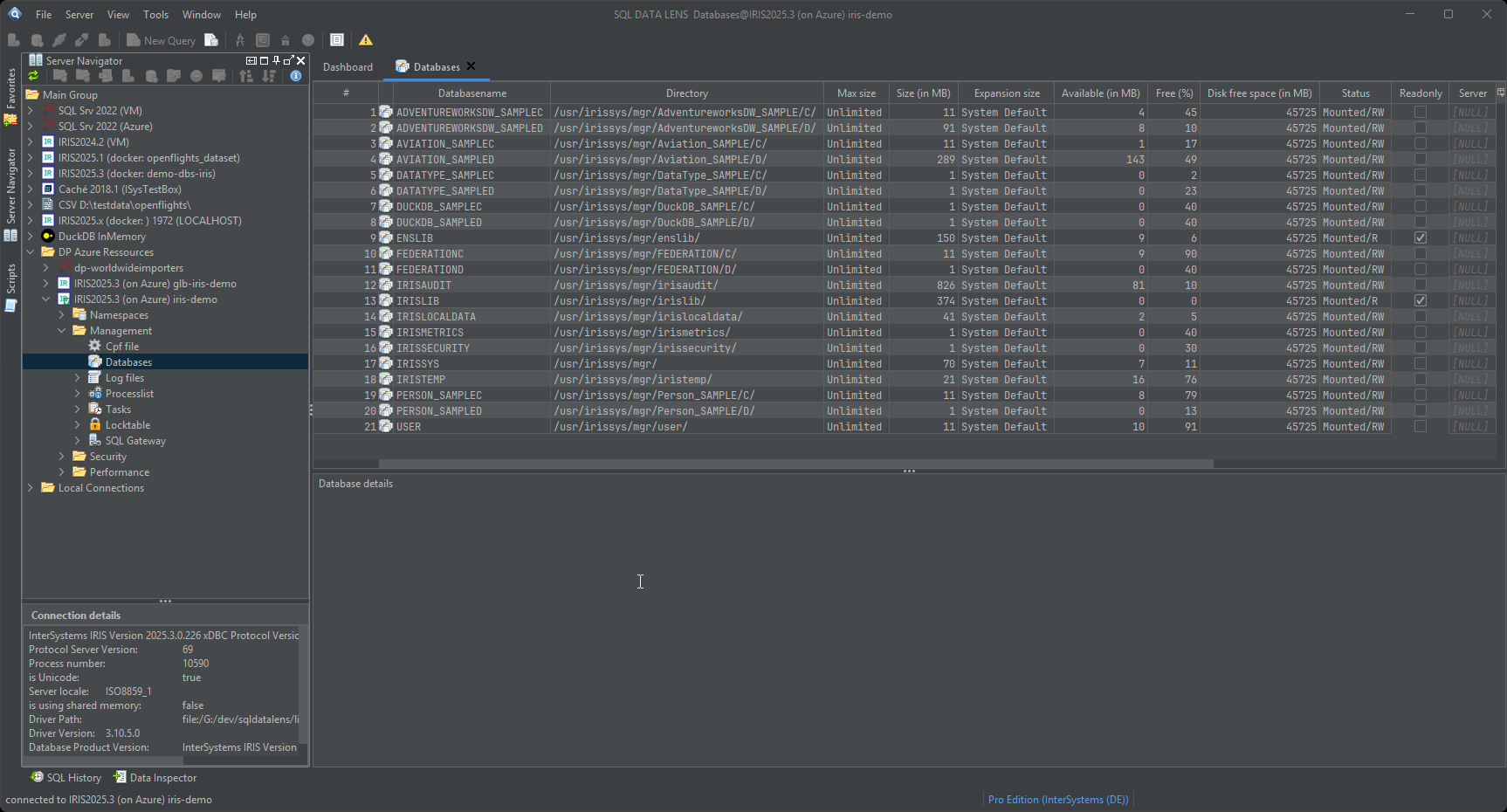
The Database viewer lists the databases on the selected Caché or IRIS server with their details. The distinction it makes visible is one that trips up everybody new to the platform, and occasionally people who are not:
- A namespace is a logical entity. It provides access to data and to code, which are typically stored in several databases.
-
A database is a file — an
IRIS.DAT, or aCACHE.DATon Caché.
So a namespace that appears empty may be mapped to a database somewhere unexpected, and two namespaces you thought were unrelated may be reading the same file. The viewer shows the mapping along with the file details — directory, size, and the resource and mount characteristics of the database — with sorting that makes a fifty-database instance usable. Namespaces themselves are listed in the Server Navigator, where remote namespaces carry a link icon and unavailable ones a red cross.
Once you know which database a namespace reads, the sizes on the IRIS storage tab of the Table Viewer tell you which tables and indexes are filling it up.
Log files, without a session on the server
The log viewer lists and displays the instance's log files in a monospaced font, so aligned columns in the log stay aligned. For IRIS servers that includes:
messages.log— the general instance log, and the first place to look after anything unexpectedjournal.log— journalling activity, switches and errorsalerts.log— entries raised to alert severityiboot.log— instance startup
Being able to read these next to the query that failed is the difference between a diagnosis and a guess: a licence limit, a journal file system filling up or a failed compile all show up here rather than in the SQL error you received.
Processes and locks
The process list shows what is running on the instance right now, and the lock view shows what is held and by whom. That combination answers the everyday question of why a statement is sitting there doing nothing — usually another process, occasionally your own previous statement from a session you thought had finished. Long-running background work and scheduled tasks are visible from the same place, which is where you look when an overnight job did not produce what the morning report expected.
Ending a process or a lock
Diagnosis is most of the value here, but sometimes the answer is that a process has to go. Terminate Process and Terminate Lock are in the context menu of the respective list, and since 4.02 they work on IRIS as well as Caché — until then they were a Caché-only capability.
Both ask for confirmation and name what they are about to end, and the status bar afterwards reports what the server really did rather than what was requested. Where the server declines — no process with that id, a system process, a privilege your account does not hold — you get that reason in plain words instead of a technical error. The connection you are working through is never ended from the process list; use Disconnect for that.
On a connection you have marked read-only, both are refused along with everything else that changes state on the server. See environments and read-only.
SQL Gateway connections
IRIS and Caché reach external databases through the SQL Gateway, and its connection definitions live on the server. SQL DATA LENS lists them, deletes them, and — the useful part — creates a server-side SQL Gateway connection from a connection you already have configured locally. Rather than retyping a JDBC URL, driver class and credentials into the Management Portal and hoping the typing was right, you point at a connection that demonstrably works in your client and push it to the server.
If you only need the data joined once, you may not need a gateway at all — Query Cloud does the join on the client with no server-side configuration and no gateway privileges.
What this is, and what it is not
This is the daily operational view for a developer, an analyst or a DBA who is already in a SQL session: read the configuration, read the logs, see the processes, understand the storage layout. It is deliberately not a replacement for the Management Portal. Security administration, licence management, mirroring, ECP configuration and backup operations belong there, and there is no good reason to duplicate them.
What is worth having in the SQL client is everything you consult while diagnosing data — and being able to consult it against any of your registered servers without logging in to each one separately. Combine it with the performance tools when the operational question turns out to be a query problem after all.
Apart from the SQL Gateway actions, which you invoke explicitly, these views only read from your instance — and none of them need anything installed on the server. Download SQL DATA LENS and point it at a test instance to see what it reports about your own configuration.
Explore your IRIS data from SQL down to globals
Download, unzip, connect. Your first namespace is on screen in about three minutes.
Windows 10, 11 and Windows Server (64-bit) · ~132 MB · version 4.02 · full 30-day Pro trial included