
Beyond IRIS
Your whole stack in one client
SQL Server, PostgreSQL, MariaDB, SQLite, Trino and more over JDBC — plus DuckDB with drag-and-drop analysis of CSV, Parquet and JSON files.
- 14 database systems over JDBC
- DuckDB in-memory, nothing to install
- Drag a Parquet file onto a connection
- A folder or ZIP of CSVs as tables
Where this fits
Be clear about the ordering. The reason to buy SQL DATA LENS is what it does with InterSystems IRIS and Caché: globals, namespaces, cached queries, class storage. Nothing on this page competes with that.
What this page is about is the other half of your week. The extract that arrives as a CSV. The SQL Server instance the interface writes to. The Parquet file from the data platform team. Handling those in the same window means you are not paying for and learning a second client to do work that is adjacent to the work you already do here.
What it connects to
Native, drivers included
9 InterSystems drivers ship inside the app — 8 IRIS versions from 3.3 to 3.11.0 plus Caché 2018.1 — loaded side by side in isolated classloaders.
- InterSystems IRIS
- InterSystems Caché
Over JDBC
Most of these drivers ship with the app. For the few that do not — a vendor driver we may not redistribute, or a version you specifically want — Tools > Manage Drivers… fetches the file for you, checksum-verified. Connections are configured once and grouped in the same tree as your IRIS servers.
- Microsoft SQL Server
- PostgreSQL
- MariaDB / MySQL
- DuckDB
- SQLite
- H2
- HyperSQL (HSQLDB)
- Trino
- Apache Derby
- Firebird
- Microsoft Azure SQL
- Microsoft Fabric
- Microsoft Access
- Microsoft Excel
Files, queried as tables
No import step, no staging table, no schema to define first. The file is the table.
- CSV (single file, folder or ZIP)
- Parquet
- JSON
Microsoft's cloud, without the connection string
Azure SQL Database, Managed Instance, SQL Server on a VM and the three
Microsoft Fabric endpoints arrived in 4.02, and they are the one
part of this list that needed more than a driver entry. Cloud connections fail
for cloud reasons — a firewall rule, a user name missing its
@servername suffix, an expired access token — and a JDBC client
that only reports "Login failed" leaves you guessing.
So there is an Azure tab that asks what you are connecting to
and how you want to sign in, offering the same seven methods SQL Server
Management Studio does — including Microsoft Entra Default, which
reuses the az login you already ran and stores nothing at all.
Where Azure gives a reason for refusing, you get that reason.
Azure SQL and Fabric in detail →
Getting a driver that is not in the download
Since 4.02 the download no longer carries the Trino, Databricks and Firebird drivers — 34 MB of files that most people never load. The entries stayed; only the files moved. Tools > Manage Drivers… now fetches one when you ask for it, and it is deliberately unexciting about how:
- You see the exact address, the size, the checksum and the licence before anything starts, with a progress bar and a Cancel button while it runs.
- The file is checked against its SHA-256 checksum and kept only if it matches. Anything else is deleted and no driver is registered.
- It lands in your user folder, so no administrator rights are needed, and the next connection uses it without a restart.
- Downloads happen only when you press the button, always over HTTPS to a fixed address that cannot be edited. Restore shipped path takes you back.
Two extensions of the same mechanism are worth knowing. Fetch by Maven
coordinate… takes something like
io.trino:trino-jdbc:483 and gets exactly that artifact — you type
a coordinate, never a URL, and the full address is shown before anything
touches the network. A checksum stays mandatory: yours, or the one the
repository publishes next to the file, and you are told which of the two it
was and what that does and does not prove. Repository… points
the same machinery at your own Nexus or Artifactory, HTTPS only, after a
warning you have to confirm — a JDBC driver is program code that runs with
your rights, and the dialogue says so.
For a machine with no internet access there is Export Bundle… and Import Bundle…: the drivers you added or fetched, packed into one file you carry across yourself, with every checksum re-verified on import and anything already present left untouched. And optionally, off by default, the driver manager will check your configured driver versions against the free osv.dev vulnerability database — sending nothing but a driver name and version, as the setting itself spells out.
DuckDB: an analysis engine that is already there
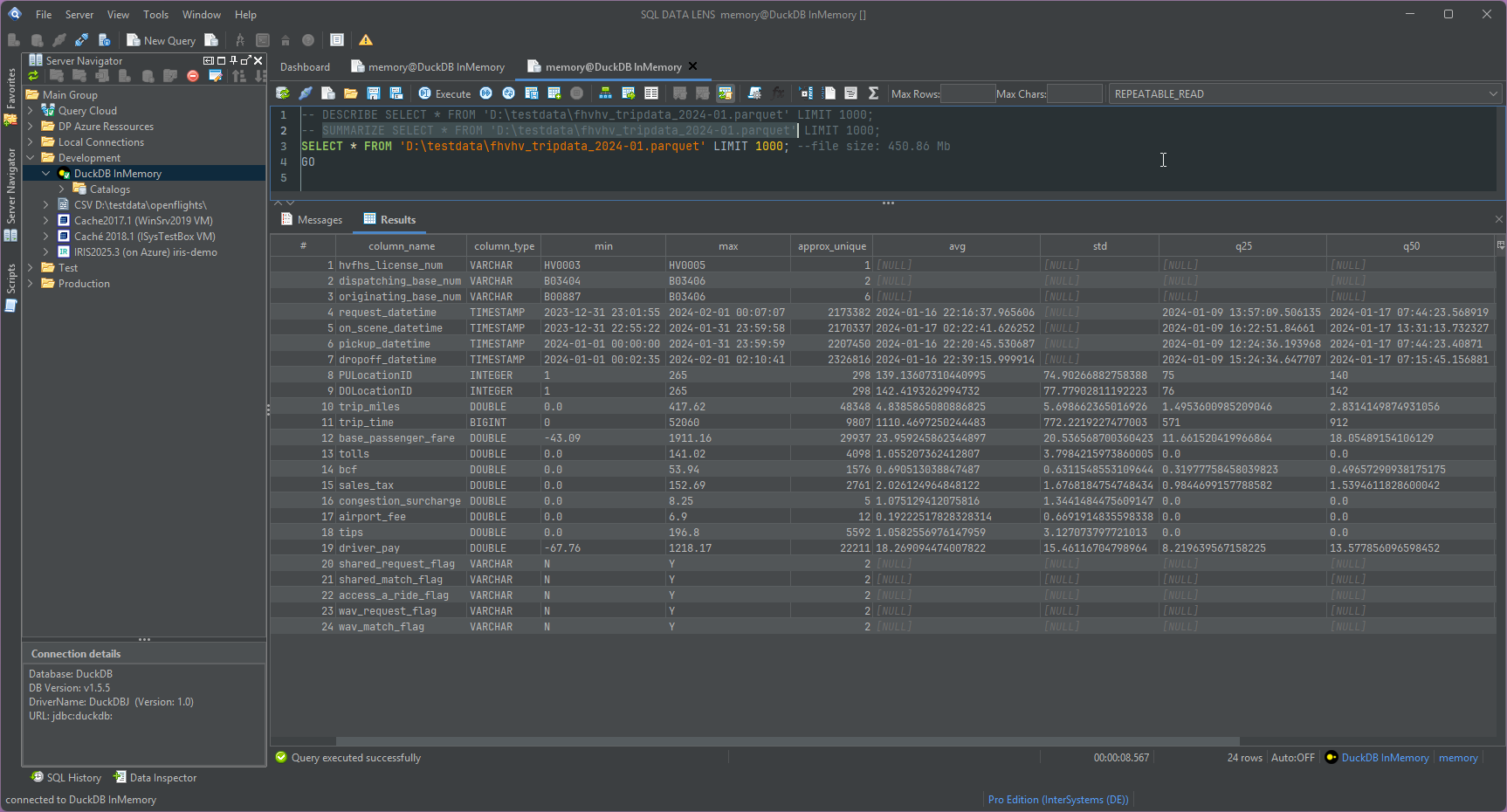
A colleague sends you a 2 GB Parquet extract and asks whether it is the right one. Before you load anything into anything, you want three facts: what columns it has, what the values look like, and how many rows there are.
SQL DATA LENS has built-in DuckDB connections that run in memory. There is no
server to install, no database file to create and no driver to download —
you open a DuckDB connection and it exists. Drag a CSV, Parquet or JSON file
onto that connection and the editor fills with the statements to inspect it:
a SELECT that runs straight away, plus a DESCRIBE
for the column names and inferred types and a SUMMARIZE for
per-column row counts, null counts, distinct counts, minimum, maximum and
averages. Those last two arrive commented out — uncomment the line and run
it. Nothing profiles two gigabytes behind your back.
That is the whole question answered in a few seconds, without importing the file, without writing a loader, and without a copy of the extract landing in a database where it will be forgotten. When you do want to keep the results, the grid exports the same way every other result grid in the app does.
CSV text connections: a folder of files as a schema
The second route to a file is a CSV text connection, which treats plain text files as SQL tables directly. Two shapes are useful in practice:
- A ZIP archive. Pick the archive and each CSV inside it becomes a table — the usual shape of an official statistics download or an export someone has mailed you.
- A folder. Point the connection at a directory and every
*.csvin it is queryable, named after the file. A folder containingpopulation.csvgives you:SELECT * FROM population LIMIT 100
Nothing is imported and nothing is converted. The files stay where they are, and when the next month's export overwrites them your queries still work.
The real payoff: one statement, two systems
Separate connections in separate tabs is convenience. Joining across them is the thing that actually saves an afternoon. Because everything above is a connection like any other, a single statement can join an IRIS table against a SQL Server table, or against the CSV file the reconciliation was delivered in — combined on the client, with nothing installed on any server.
That is Query Cloud, and it is where the generic-database support stops being a checkbox. "Which of the 4,000 IDs in this spreadsheet are missing from the production namespace?" becomes one query instead of an export, an import and a temporary table.
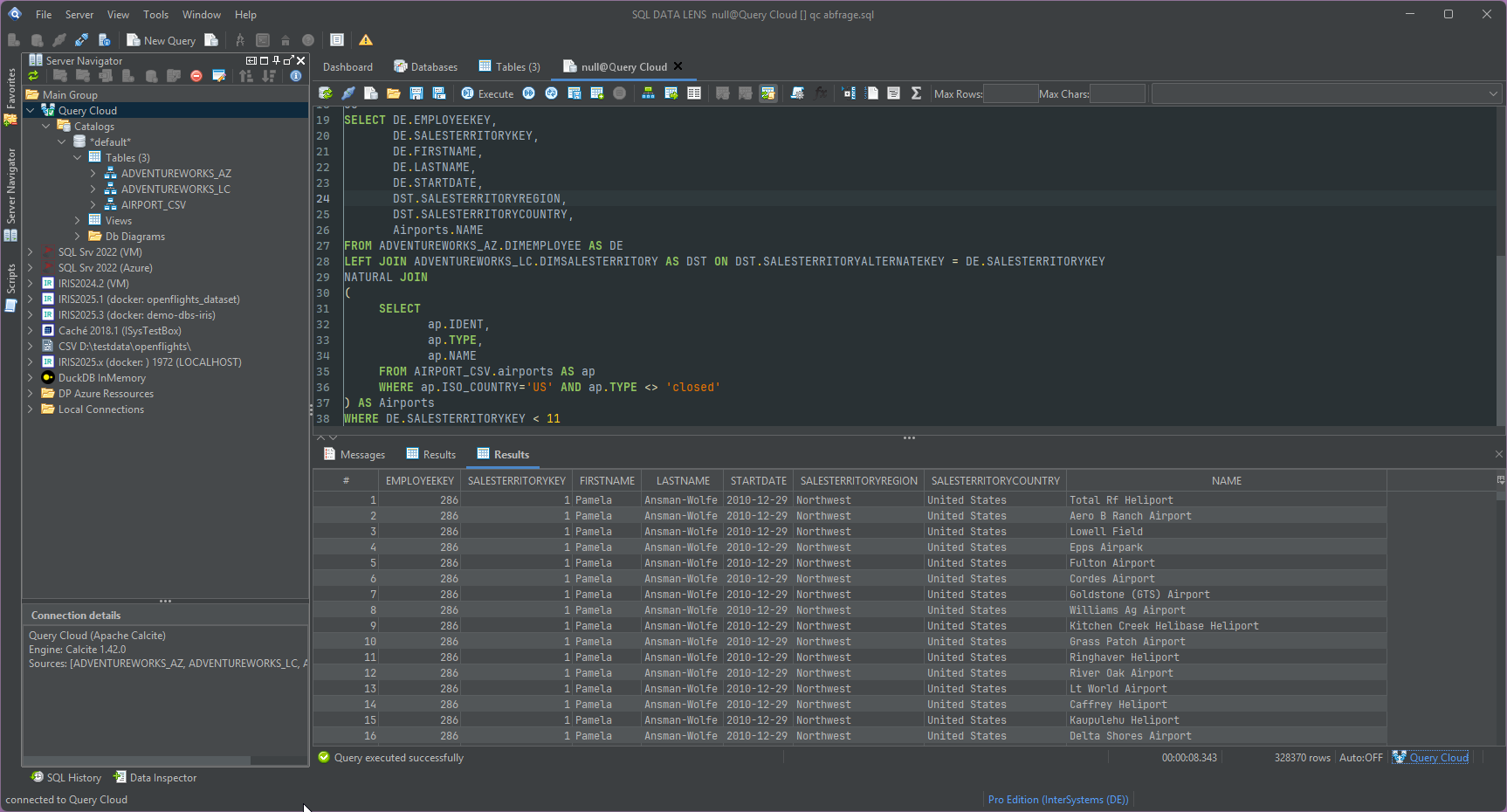
Everything else you expect from the app applies to these connections too: the same Table Viewer for browsing and filtering, the same editor, the same export formats. The IRIS-specific views are naturally absent — a PostgreSQL database has no globals to browse.
When a generic tool is the better answer
If your team runs thirty database systems and IRIS is a footnote among them, a generic client is the right choice, and DBeaver or DataGrip will serve you better than this will. They cover more engines, they have deeper support for each engine's own dialect and administration, and they run on macOS and Linux today.
SQL DATA LENS is built the other way round: IRIS and Caché in depth, with enough breadth that a second tool is usually unnecessary. If IRIS is where your difficult questions live, that trade is worth making. If it is not, it is not.
The honest comparison with DBeaver, DataGrip and the Management Portal →
Common questions
Is this a DBeaver or DataGrip replacement?
For an IRIS-centric team, usually yes in practice — the generic support here covers the everyday cases and the IRIS support is far deeper. As a general claim, no. A dedicated generic client supports more engines and more engine-specific tooling than this does, and we would rather say so than have you find out in week two.
Which drivers do I have to supply myself?
Fewer than before, and none of them by hand. The InterSystems drivers are bundled — 8 IRIS versions from 3.3 to 3.11.0 plus Caché 2018.1 — as are Microsoft SQL Server (13.4.0, also behind Azure SQL and Fabric), PostgreSQL 42.7.13, MariaDB, DuckDB, SQLite, H2, HyperSQL, Access, Excel and the CSV/DBF drivers.
Trino, Databricks and Firebird are not in the download since 4.02 — which is 34 MB of the reason it got smaller — but their entries are still in the driver list, and Get Driver File… fetches them. Apache Derby has never shipped one and works the same way. Databricks wants you to accept its licence terms first, so that entry sends you to the vendor page and then takes over the file you downloaded there.
Does the Free edition cover these connections?
The Free edition covers databases that are themselves free to use: DuckDB, SQLite, H2, HyperSQL, Apache Derby, PostgreSQL, MariaDB, Trino, and SQL Server Developer or Express. So the whole file-analysis workflow on this page works in Free, permanently. A licensed production database — IRIS or otherwise — needs a paid edition, and so do Azure SQL and Microsoft Fabric, which are commercial cloud services. See pricing for the exact rule.
Are CSV and Parquet files read-only?
Treat them as read sources. The point of a file connection is to inspect and query data where it already is, then join it against a real database or export the result. Writing back into a delivered extract is not a workflow the tool encourages.
Next step
The fastest way to judge this is to open a DuckDB connection and drop your most annoying file onto it. That path needs no licence and no server.
Explore your IRIS data from SQL down to globals
Download, unzip, connect. Your first namespace is on screen in about three minutes.
Windows 10, 11 and Windows Server (64-bit) · ~132 MB · version 4.02 · full 30-day Pro trial included