
Script Manager
Keep a large SQL script library under control
Organise hundreds of SQL scripts, preview them without opening them, and run them against the right connection.
- File browser inside the app
- Folders, rename, copy, move, delete
- Preview before opening
- Opens on the right connection
Everyone who works with a database for a few years accumulates a folder of SQL
files. The monthly reconciliation query. The one that finds orphaned records.
The cleanup script with the comment at the top saying which environment it must
never be run against. After a while there are two hundred of them, half with
names like test2_final.sql, and finding the right one through the
Windows file dialogue means opening five wrong ones first.
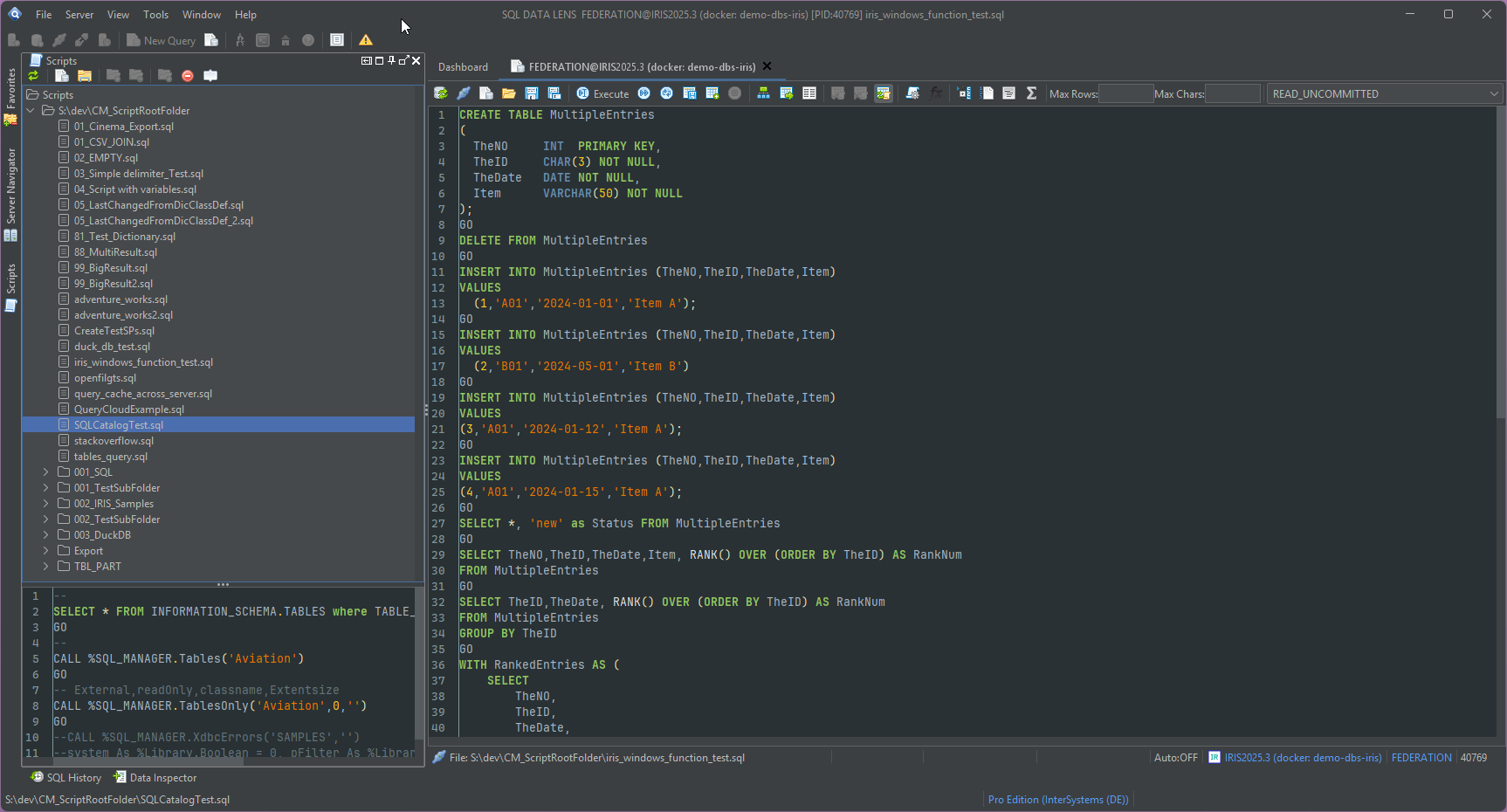
A file browser that lives inside the tool
The Script Manager is a file system browser built into SQL DATA LENS. It works
on your ordinary .sql files in ordinary folders on disk — there is
no proprietary repository, no database table holding your scripts, and nothing to
migrate if you stop using the tool. Point it at the folder your scripts already
live in and it lists them.
Everything you would otherwise switch to Explorer for is available in place:
- Open a script into a new editor tab
- Rename a file, without closing anything
- Copy a script as the starting point for a variant
- Move files between folders
- Delete files you have finished with
- Create folders to organise what is there
Preview before you open
Selecting a script shows its content without opening it in an editor tab. That
sounds minor until you have twelve files whose names all begin with
invoice_: a glance at the first few lines of each is the fastest way
to identify the one you want, and you end the session with one editor tab open
rather than twelve.
Because the underlying files are plain text in plain folders, the whole library works with the tools you already use around it. Keep the folder in Git and the history, diffs and blame come for free. Put it on a shared drive and the team's scripts are one folder tree rather than an email thread.
Organising a library that has grown
Folders are the only structure imposed, and in practice that is enough. What works for most people is a small number of top-level folders that match how the scripts are used rather than what they touch — for example:
sql/
  daily/          checks you run every morning
  reports/        queries whose output goes to someone else
  maintenance/    tune table, rebuild index, cached query cleanup
  diagnostics/    integrity checks and one-off investigations
  archive/        kept because it worked once
Renaming and moving from inside the Script Manager makes that reorganisation something you can do in ten minutes on a quiet afternoon, instead of a job that needs a second window and a lot of resolve.
Running a script against the right connection
A script opens into the SQL editor, and there it inherits everything the editor does. That is the part that makes the library genuinely useful rather than merely tidy:
- The connection is explicit. Each editor holds one connection, shown in the status bar, and the toolbar connect button switches an open script to a different server or namespace. A cleanup script that must run against test and not production is a deliberate choice rather than an accident of which window had focus.
-
GObatches and F5 / F7 / F9. A long maintenance script separated byGOcan be run one statement at a time as you check each result, or all at once when you trust it. - Parameters. Scripts support parameter placeholders, so the same file serves for every customer, period or namespace instead of being copied and edited each time.
- Export and streaming to file. A reporting script can write results straight to CSV, XLSX or JSON without holding them in memory, which is what makes a scheduled-feeling extract practical from a desktop tool.
Session snapshot completes the picture: when you close SQL DATA LENS, every open editor tab and its connection are saved and restored on the next start, so a half-finished investigation survives a reboot. SQL history covers the statements you ran but never saved — and when something out of the history proves worth keeping, the Script Manager is where it should go.
Scripts against several systems
The same library can serve more than one kind of database. A script written for IRIS and a script written for SQL Server sit in the same tree, and the connection you open them against decides which dialect is in play — including the connections to other systems described under Beyond IRIS. Scripts that must work everywhere are simply the ones you write in portable SQL.
A script library is only as good as your ability to find things in it, and that
is the whole job of the Script Manager.
Download SQL DATA LENS, point it at the folder your .sql files are already in, and
see how much of the collection you had forgotten about.
Explore your IRIS data from SQL down to globals
Download, unzip, connect. Your first namespace is on screen in about three minutes.
Windows 10, 11 and Windows Server (64-bit) · ~132 MB · version 4.02 · full 30-day Pro trial included