
An access failure is the friendly kind of metadata defect. The driver cannot read the value, it throws, and you know within a second that something is wrong. The overview article Detecting and resolving metadata inconsistencies in InterSystems IRIS covers that case and the two below in outline.
This article is about the other two. Neither produces an error message. Neither produces a warning, a log entry or a visual hint. A row can be read by every client you own and still contradict the metadata the same client just received. I call the two variants silent corruption and undetected mutation.
Both are built into the DATATYPE_SAMPLE database, so everything below is reproducible rather than anecdotal:
Silent corruption
The Employee table contains a deliberately manipulated record that demonstrates the behaviour: the row with ID = 110. At first glance, and even at second glance, nothing is wrong with it. Neither the database driver nor the query tool reports a problem when reading this row.
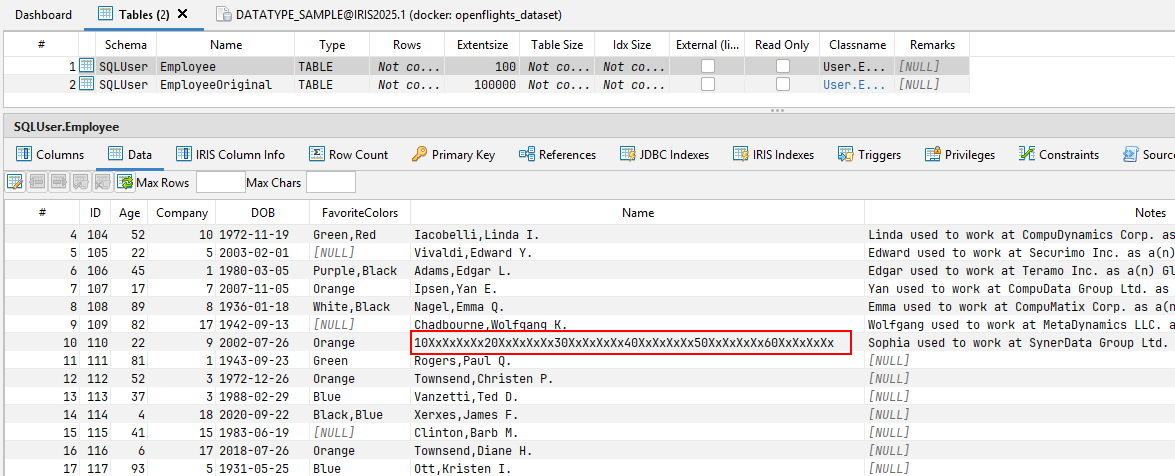
Only on close inspection does it become clear that the value in the marked cell does not match the metadata the driver transmitted for that column. The Name column is declared VARCHAR(50). The value is 60 characters long.
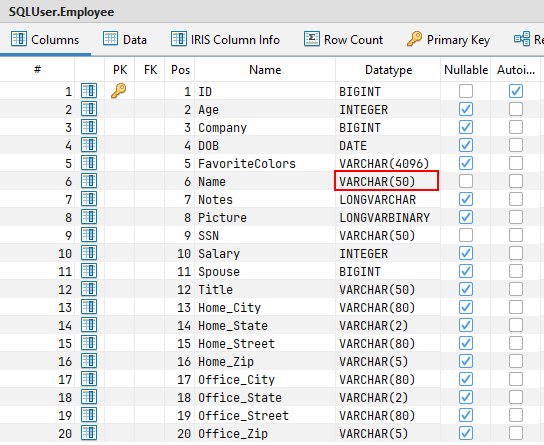
The demo value makes this easy to verify by eye: it counts itself off in blocks of ten, and it runs past the 50 marker to 60XxXxXxXx. In a real database the overrun looks like an ordinary name and nobody counts.
Why it matters
There are scenarios where this behaviour causes no trouble at all, because the driver handles the inconsistency leniently and the value is only ever displayed. Problems start where a downstream system relies on the metadata it was given. If further processing is built on those definitions, errors occur as soon as the actual content violates the agreed interface.
ETL tools are the typical example. They generate target tables from source metadata, or define transformations against it, and a 60-character value arriving in a column sized from a VARCHAR(50) declaration is rejected or truncated. The failure surfaces in the target system, a long way from the row that caused it.
Finding it
The following query identifies records whose content deviates from the declared metadata:
SELECT
 Name,
 CASE WHEN LENGTH(Name) > 50 THEN 1 ELSE 0 END AS Name_LENGTH_CHECK
,SSN,
 CASE WHEN LENGTH(SSN) > 50 THEN 1 ELSE 0 END AS SSN_LENGTH_CHECK
FROM SQLUser.Employee
WHERE
      LENGTH(Name) > 50
OR    LENGTH(SSN) > 50
It returns only the rows that contain an error. In each row, the offending cell is flagged with a 1 where the value exceeds the length the metadata defines.

Undetected mutation
The second defect is subtler. DATATYPE_SAMPLE carries a record changed specifically to illustrate it: the row with ID = 120. Again, neither the driver nor the query tool reports a problem when reading it.
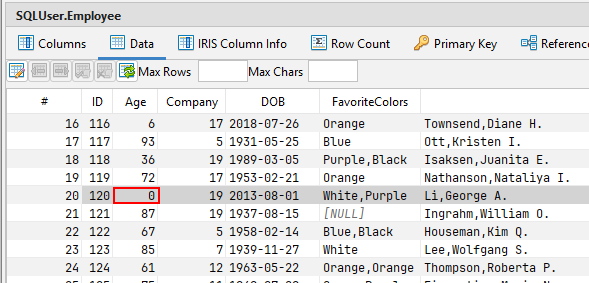
This time the value even appears to match the metadata. The Age column is declared INTEGER, and the cell duly returns an integer, in this example 0.
That value is not stored in the database. A direct look at the underlying global reveals the real content: through manipulation, a string was injected into the field.
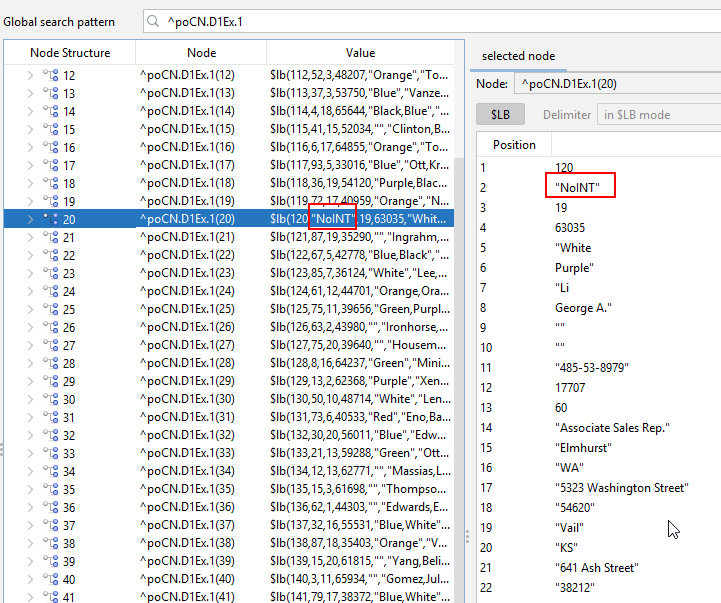
The Global Browser resolves the node ^poCN.D1Ex.1(20) into its $LISTBUILD positions. Position 2, the one projected as Age, holds the string "NoINT". The driver cannot make an integer out of it and delivers 0 instead. The result set is internally consistent and completely wrong.
This is the failure mode that matters in reporting and migration work. An access failure stops the job. A mutation lets it finish with a wrong number in it, and a coerced 0 in an age, salary or quantity column is aggregated, averaged and charted without complaint.
Finding it
SELECT
 CAST(Age AS VARCHAR(255)) AS Age,
 ISNUMERIC(CAST(Age AS VARCHAR(255))) AS Age_ISNUMERIC
FROM SQLUser.Employee
WHERE
    ISNUMERIC(CAST(Age AS VARCHAR(255))) = 0
Casting to VARCHAR first is the whole trick: it bypasses the coercion that produced the 0 and hands you the stored representation. The query returns only the rows that carry a metadata inconsistency, and flags the problematic cell with a 0 where the value cannot be interpreted as numeric by the driver.
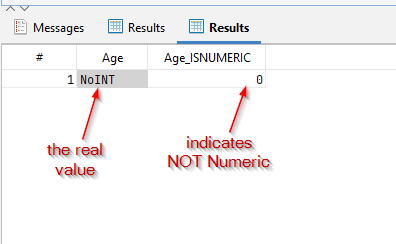
The Age column now shows NoINT — the value that was really stored — and Age_ISNUMERIC returns 0 to mark it.
Final thoughts
These scenarios show how seemingly well-formed data can conceal subtle inconsistencies, especially in legacy systems that bypass the standard safeguards. Access failures are easy to spot. Silent corruption and undetected mutation usually go unnoticed, and they cause serious problems downstream, particularly in systems that depend on strict metadata compliance.
The DATATYPE_SAMPLE database and the two queries above are enough to identify such issues by hand. But writing these checks by hand is tedious and error-prone: every column needs its own predicate, and the predicates have to be rewritten whenever the class definition changes.
SQL DATA LENS generates them instead. Since version 3.22 the SQL scripting menu offers SELECT with length check and SELECT with numeric check, which build the statements above from the current metadata of a table, view or stored procedure. The SQL editor runs them, the Table Viewer is where you reach them, and the Data Inspector shows how a structured value is really encoded when a finding needs a closer look.
If you have not installed the tool yet, start at the download page. For the third failure mode, the one that does throw, see Detecting and resolving metadata inconsistencies in InterSystems IRIS.
This article first appeared on the InterSystems Developer Community as Testing Metadata Inconsistencies in InterSystems IRIS Using the DATATYPE_SAMPLE Database (Part II) — Silent Corruption. SQL DATA LENS is also listed on InterSystems Open Exchange.